MCS Mate Code Studio Small Business Software & Web Studio
In-house software Business workspace

MateOS

One internal workspace for opportunities, client work and day-to-day operations.

MateOS is the internal workspace built for Mate Code Studio. It keeps research, client records, follow-ups, delivery capacity, invoices and recurring operational tasks in one place, so the work that needs attention is easier to see.

MateOS · Dashboard

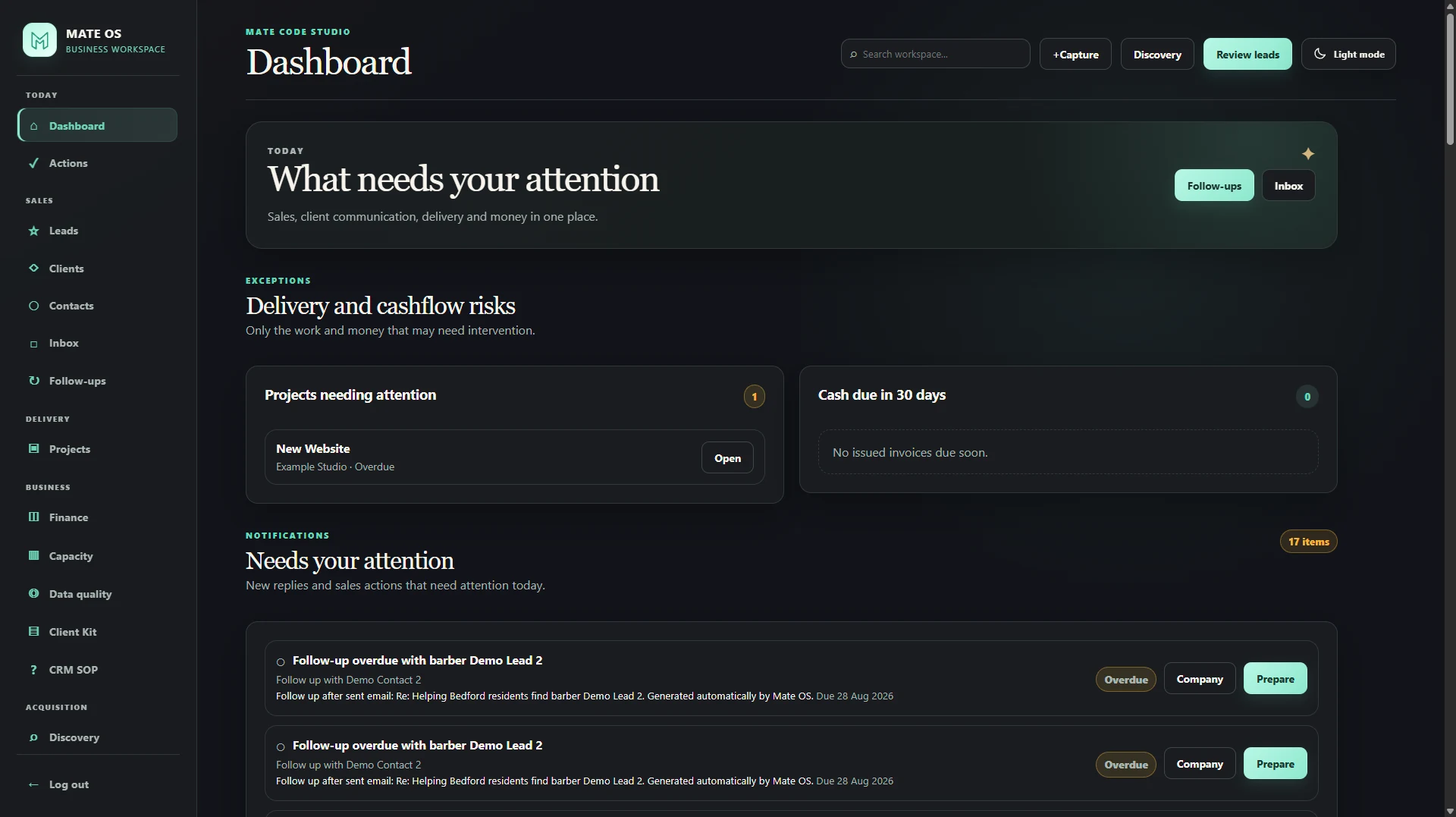
MateOS dashboard showing work that needs attention, delivery risk and cashflow visibility
Project type In-house business software
Use case CRM / Operations
Primary focus Daily visibility + follow-up
Status Working internal MVP

The project

The problem was not a lack of tools. It was having to check too many places.

Running a small studio still creates a lot to keep track of: businesses to research, conversations to remember, follow-ups to complete, projects to deliver, invoices to watch and available capacity to understand.

Generic CRMs can cover parts of that work, but I would still be moving between sales tools, inboxes, project notes and spreadsheets. MateOS started with a simpler question: what do I need in one place to run Mate Code Studio day to day?

Research, client context and delivery can quickly end up in separate places.

The problem is usually a collection of small misses: a business that never gets reviewed, a follow-up that slips, a project that becomes overloaded, an invoice that needs attention or a conversation that has to be reconstructed from memory.

Give Mate Code Studio one place to see what needs attention from first contact to active delivery.

It needed enough structure to support daily work without turning into a miniature enterprise platform.

  • Research and review potential businesses
  • Keep client and contact context together
  • Surface due and overdue work
  • See delivery capacity before taking on more work
  • Keep payment and operational risks visible

A practical internal workspace that connects the parts of the business I use every day.

MateOS connects business research, CRM records, follow-ups, active projects, capacity planning, payment visibility and recurring operational actions in one place.

The point is not to have more modules. It is to keep the context from one stage of work available when the next stage begins.
A deliberate decision

The dashboard starts with what needs attention.

The dashboard is not there to fill the screen with charts. It brings together the work, money and relationships that may need attention, with the relevant action close by.

Projects at risk, cash due, follow-ups, overdue actions, client messages, active work and businesses waiting for review are more useful to me than vanity metrics.

The same idea carries through the rest of MateOS: keep related information together and reduce the time spent working out what happened before.

What was built

The parts I use to run the studio day to day.

Each area exists because it solves a recurring part of the work. MateOS is not trying to reproduce a generic CRM feature-for-feature.

Decision-focused dashboard

Today, overdue work, project risk, cashflow signals, messages and review queues are surfaced in one action-oriented starting point.

Targeted discovery

Potential businesses can be researched in selected markets and kept separate from the CRM until they are worth reviewing further.

Lead review & prioritisation

Research can be filtered and reviewed before a business becomes an active CRM record, keeping early-stage information separate from real client relationships.

Client CRM

Prospects, leads, clients and past clients stay searchable with business context, lifecycle status and contact policy in one place.

Capacity planning

Weekly allocation, deadlines and a six-month availability view help protect delivery capacity before new work is committed.

Operational automation

Deterministic rules can create actions around events such as opportunity wins, waiting on clients, invoice reminders and payment chasing.

Workflow

From first research to active delivery, the context stays with the work.

MateOS follows the same basic path I use in the business: research a potential company, review it, move relevant relationships into the CRM, keep the next action visible and plan delivery once work becomes real.

  1. Research
  2. Review
  3. CRM
  4. Follow up
  5. Deliver

Inside MateOS

A look at the parts of MateOS used day to day.

These six views show the parts of the system I use for daily priorities, research, client management, delivery planning and recurring admin.

01 · Dashboard

The dashboard starts with what needs attention today.

The dashboard brings together delivery risk, cashflow, follow-ups, overdue actions, messages, active projects and businesses waiting for review in one place.

02 · Discovery

Potential businesses stay in a review step before they enter the CRM.

Research can be collected by market and location, then reviewed separately instead of being mixed straight into active client records.

03 · Lead review

Research stays separate until there is a reason to progress it.

The review queue keeps prioritisation and service-fit notes together before a business progresses into the CRM.

04 · Client CRM

The relationship stays visible as it moves from prospect to client.

Search, lifecycle filters and contact controls keep business context usable across prospects, leads, clients, past clients and archived records without splitting the relationship across separate tools.

05 · Capacity planning

New work only makes sense if there is room to deliver it well.

Monthly capacity, weekly allocation, deadlines and a six-month forward view make availability visible before more work is committed.

06 · Automation

Routine operational follow-up should not depend on remembering it.

Configurable rules turn clear business events into predictable actions, including opportunity wins, waiting on clients, invoice reminders and payment chasing.

Built with constraints

Built for one business, not for everyone.

MateOS is built for one operating environment: Mate Code Studio. Features are added because they solve a recurring operational problem, not because a generic CRM is expected to have them.

Research and discovery are separate from the core CRM. If new work comes through referrals, website enquiries or manual research, the rest of MateOS still works in the same way.

That keeps the MVP useful now and leaves room to add finance, delivery or automation features when daily use proves they are worth having.

The outcome

A working internal MVP that gives Mate Code Studio one place to manage opportunities, client work and day-to-day operations.

MateOS is not a SaaS product or a promise of automated growth. It is a working internal tool that gives me one place to understand relationships, see what needs attention and keep delivery organised.

Need an internal tool?

Your business does not need MateOS. It may need its own focused version of the same idea.

If important work is spread across spreadsheets, inboxes and generic tools, a focused internal system can put the information and next actions in one place.