Case study

Budgeting App

A Flask-based personal finance web application designed to help users manage income, expenses, budgets, accounts, and transactions from one structured dashboard.

This project shows the kind of software I enjoy building: practical, data-driven tools that turn scattered information into something easier to understand, manage, and improve over time.

Python 路 Flask 路 SQLite 路 HTML 路 CSS 路 JavaScript

The challenge

Personal finance data becomes difficult to understand when it is spread across too many places.

Many people start tracking money with spreadsheets or notes. That works at the beginning, but it often becomes harder to maintain as the user adds more accounts, more categories, more transactions, and more months of financial history.

The core problem was not only storing financial records. The real challenge was creating a clearer way for users to see what happened, where their money went, and how their budget compared with their actual activity.

The solution

A structured web app that brings accounts, budgets, and transactions into one workflow.

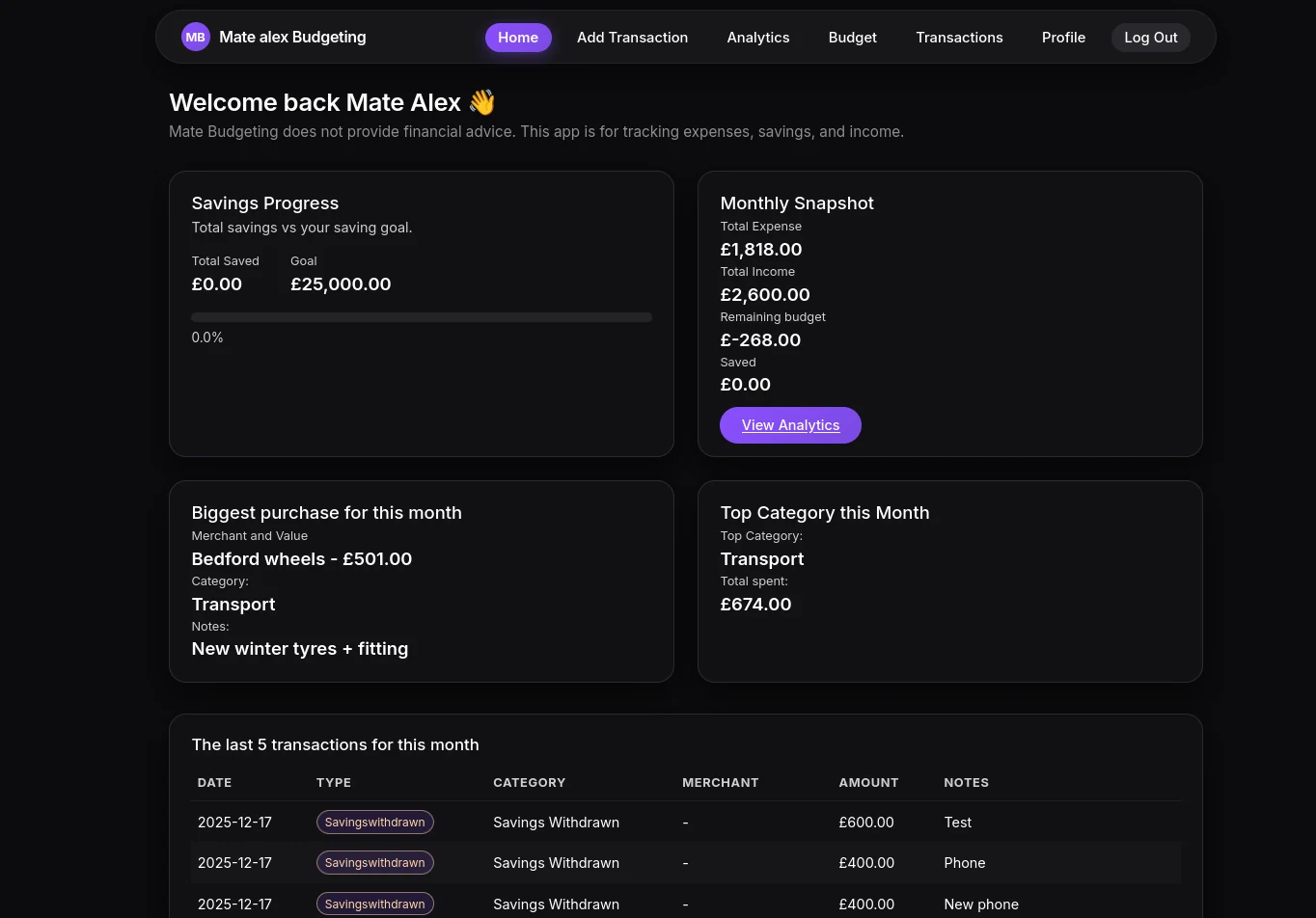
I built a Flask application that allows users to register, manage their profile, set up budgets, add income and expense transactions, and review their financial activity from a central interface.

The goal was to create a practical foundation for a real budgeting product: clear navigation, organized database-backed data, editable records, and dashboard-style views that make the app useful beyond a simple form-and-table project.

Project goals

What I wanted this app to prove

  • Build a complete Flask application with multiple user flows
  • Use SQLite to store structured financial data
  • Create authentication and user-specific account management
  • Make transaction tracking easier to search, edit, and understand
  • Present financial information in a cleaner dashboard-style layout
  • Show that I can turn a practical idea into a working web app

Core features

What the app includes

  • User registration and login
  • Profile settings and account management
  • Budget setup by category and month
  • Income, expense, and savings-style transaction tracking
  • Transaction history with filtering and editable records
  • Dashboard views for financial activity and yearly overview
  • SQLite database structure for storing user data
  • Responsive interface built with HTML, CSS, Bootstrap-style layout, and JavaScript

Technical approach

How I approached the build

I used Python and Flask for the backend because the project needed clear routing, form handling, user sessions, database queries, and multiple connected pages. SQLite was a good fit because the app needed relational data without unnecessary deployment complexity.

The frontend was built with HTML, CSS, and JavaScript to create the user interface, improve interactivity, and present the app as a more polished product instead of a basic backend exercise.

Development decisions

Important decisions behind the project

  • Keep the first version focused on personal finance essentials
  • Use simple, readable routes instead of over-engineering the app
  • Prioritize editable data because users need to correct mistakes
  • Separate budget setup from transaction tracking for clearer user flow
  • Design the project so future features could be added later

What I learned

This project improved the way I think about full web applications.

The biggest lesson was that a useful app is not only about writing code that works. It also needs clear structure, user-friendly flows, sensible database design, and pages that help the user understand what to do next.

Building this app helped me improve in Flask routing, SQL queries, template structure, authentication flow, form handling, frontend layout, and the overall process of turning a rough idea into a working product.

Business value

Why this project matters for client work

This app is important because the same thinking applies to real client projects: businesses often have scattered data, manual processes, messy spreadsheets, and workflows that need to become easier to manage.

A budgeting app is one example, but the pattern is broader: take a real process, organize the data, create a clear interface, and build a tool that saves time or makes decisions easier.

Screens

Project screenshots

These screens show the main user flows: authentication, dashboard, profile settings, transaction entry, budget setup, and financial overview pages.

Need something similar?

I can help build practical dashboards, Flask apps, and automation tools.

If you have a spreadsheet, workflow, internal process, or small app idea that needs to become easier to use, send me a message. I can help you shape the idea, plan the build, and turn it into a working solution.